Final Cut Pro X 10.2.3 by Adrian Galli

Final Cut Pro X has received a lot of criticism since its released over in 2011. I’m bold enough to call people out on all of it as Final Cut Pro X is coming upon five years old and, as a professional in the industry, I can safely say it is one of the best editing systems I’ve used. I’m not only certified in Final Cut Pro X, I’ve written curriculum for training in Final Cut Pro X, I’m one of the highest endorsed Final Cut Pro Editors in North America, I’ve spent hundreds of hours using it, and edited literally a hundred (perhaps more) projects using it.

Final Cut Pro X is a radical change in non-linear editing systems; trackless editing, outstanding multi-cam support, no rendering, multicore processes, 64-bit support, keyword organization, and so much more. Most other systems were designed in the early to mid 90’s still look and work pretty much the same way as they have for the past two decades. They feel like nonlinear editing systems designed by linear editors. Final Cut Pro 'classic' felt the same; FCP X took a bold stance against such antiquated standards and made something new.

But, that isn’t to say there haven’t been improvements, bugs, and other things popping up in such a complex application. The long awaited Final Cut Pro X 10.2.3 was released today with a great number of improvements and stability updates. Check out the list of updates below.

New in Final Cut Pro X 10.2.3:

  • Customizable Default Effect lets you choose both a video and audio effect that is assigned to a keyboard shortcut
  • 4K export preset to create video files for Apple devices
  • Improves speed when opening libraries on a SAN
  • Resolves an issue that could affect the timecode display in the Dashboard on OS X El Capitan
  • Import Canon XF-AVC including video files from the Canon C300 Mark II
  • Ability to share video to multiple YouTube accounts
  • Resolves an issue in which a disabled video effect could appear as Missing Effect when opening the project or when sharing to Compressor
  • Addresses an issue in which black frames could appear in imported iPhone video clips that were trimmed on iPhone
  • Fixes an issue that could cause the playhead to jump ahead when editing short titles
  • Fixes an issue that could cause the timeline to stop playback when switching views in the Browser
  • Fixes an issue in which points on a Bezier shape could incorrectly switch from Linear to Smooth
  • Fixes an issue in which some objects within Motion templates render with soft edges
  • Adds iPhone 6s, iPhone 6s Plus, iPad Pro, and Apple TV (4th generation) to the Apple Devices compatibility list in the Share window

You can purchase or update Final Cut Pro X from here. Enjoy!
Day One v2 by Adrian Galli

Day One 2 for OS X

Day One 2 for OS X

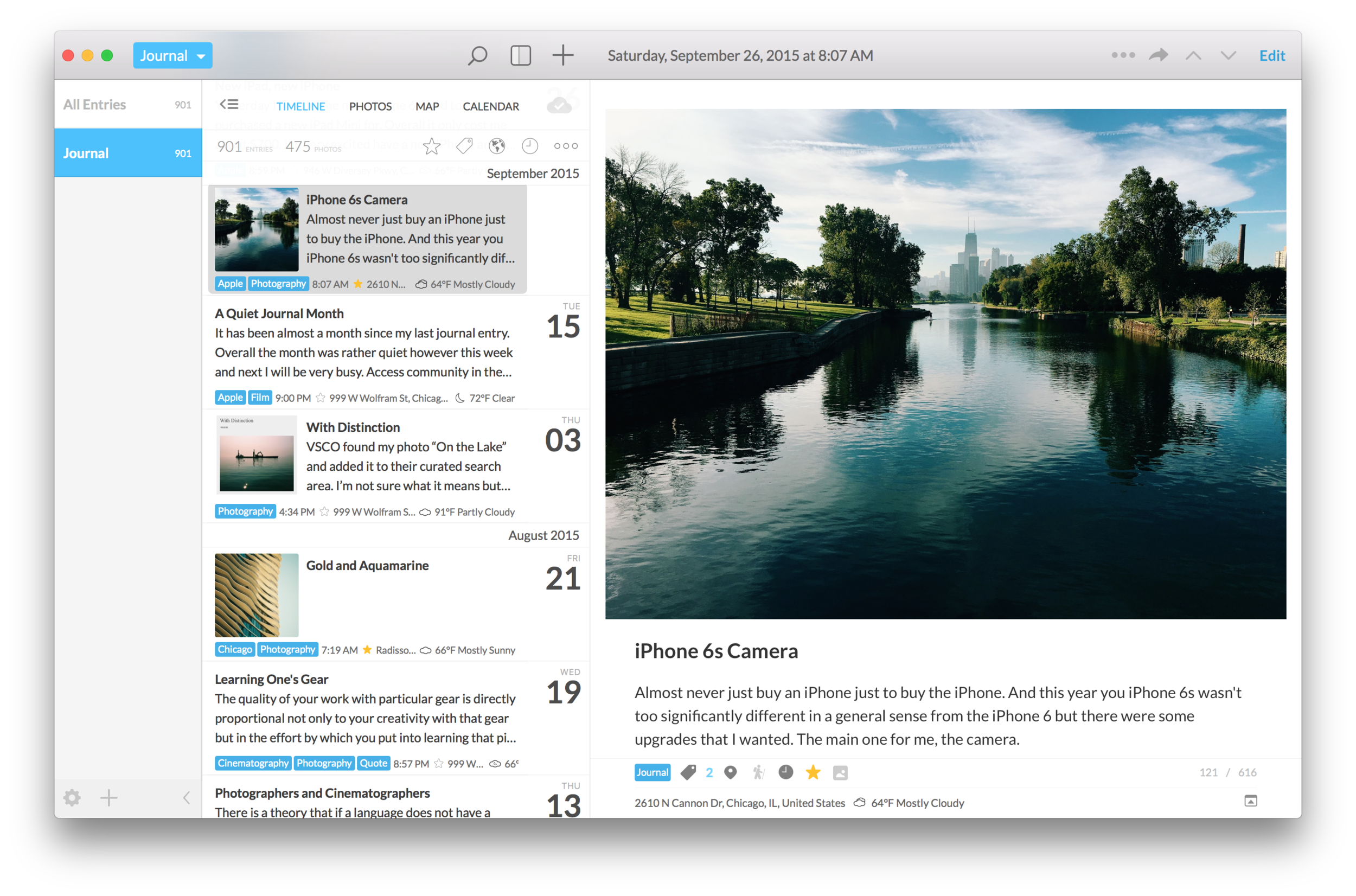
Day One was released in 2011. An outstanding journaling app, it quickly won the hearts of many including receiving App of the Year in 2012 from Apple. It has been one of my favorite apps both on iOS and Mac. It is both a powerful and beautiful application on both platforms.

While this isn’t really a post about photography or filmmaking, per se, I find the journaling app to be a valuable asset to me as a photographer. My photos tell my story or I tell a story with my photography. Wherever I travel, whatever I am doing, I find ways to fit photography into my life. One of my most favorite activities when I travel is simply to roam around photographing the places I go. Day One is a companion for a photographer to journal particularly special photos and places one has been; a map view will show you locations where one was when the entry was created of the geotag of the photo. 

I find it relaxing to write down a few thoughts, add a photo, or even just geotag my entry for later review. Journaling was never part of my life until I had the access to a digital one; no matter where I was or what device I had with me, I could add an entry. As Day One has a sync service, I can quickly add an entry from my Apple Watch, just a sentence or two or a location. I can write from my iPhone or my iPad. Or, if I need to write even more, I can do it from my Mac and all my entries will be found on all my devices. Sometimes it is just a photo, sometimes just text, and sometimes a combination of the two.

An entry in Day One 2 for iOS

An entry in Day One 2 for iOS

I write this post on the day a new version of Day One is released. Day One 2 rebuilds an already great app. I have only had moments to work with it but it has already proven to be a worthy upgrade. Probably my favorite new feature is the ability to add multiple photos to an entry. Before, it was only one but so many times I found that I my journal entry was incomplete, not telling the whole story with only one image. Now these entries are more dynamic with a digital scrapbook feel. Perhaps a landscape photo where I travel can remind me of the beautiful site while another photo reminds me of the time with friends or family. Day One 2 becomes not only a journal but also a living news feed of life.

As one goes through daily life, it is easy to think we’ll remember everything when, in fact, we won’t. Day One helps piece together our lives with photos, written entries, geo-locations, weather, and even what kind of locomotion at the moment of the entry (train, car, walking, sitting, etc.). A year, ten years, or decades from now, one can open their digital journal and time travel to remember photos, places, faces, and more from long ago.

I highly recommend Day One 2 for Mac and iOS to anyone but for us photographers, this journaling app is a close connection to our passion. Both can be purchased now; the Mac version here and the iOS version here. A timeline of life is something that one can appreciate forever. It is always a pleasure to rewind and reflect on something that might have been forgotten.

P.S. They are 50% for the next week. Ge them at the discounted price while you can!

Abstract Update by Adrian Galli

My projects tend to be numerous but my 2016 iPhone Photography venture is flexible. Having my iPhone 6s with me at all time, anytime, anywhere inspiration hit, I can continue this abstract photo series.

Abstract ACG (2)

Abstract ACG (2)

Light, shadow, blur, and motion the foundation for this project. It has been great fun looking ay literally anything and gaining inspiration to capture an image. There are many things in this world worth photographing but many, many more that are not. When it comes to shooting abstractly, one find a great freedom in both what has the potential for being interesting.

Some of my images from the Abstract series have simple been captured while sitting at work, visualizing a pattern with motion and blur, or looking up when others are looking down. General composition withstanding, many common photography practices are lifted and definitions of "what photography is" (whatever that even means) is not necessarily applied.

Shot on iPhone 6s